Showing posts with label iphone. Show all posts

Monday, July 31, 2023

Photography - a gear rabbit hole


Credit: whatsthebest.co.uk

Anyone who's looked in on this blog over the years will know I like photography. An avid amateur rather than a skilled enthusiast, but I like to think over the years my photography has improved. You can check out a lot of my efforts on my Flickr pages to judge for yourself.

Ultimately of course whilst it's the camera that takes the shot, it's the photographer that sets the camera settings, determines the composition, and where needed and/or necessary does any "post-processing" to tweak the image to their satisfaction.

Like many photographers, I've got through some (probably too much) gear over the years but like many, I also have a tendency to always be looking for the ideal camera setup. The reality is though, that pretty much any camera from the last few years is going to be more than good enough to take great pictures for 99% of people. 

I've recently come very, very close to selling two of my three main cameras and swapping out for another brand - for some sound reasons, but in the end (for the moment at least), I've stuck with what I have because what it serves me well enough.

It's perhaps worth noting here, that (some) photographers can be a snobby lot, both in terms of brand favouritism and/or camera (or rather sensor) size. Basically, the bigger the sensor, the more light comes into the camera and (theoretically at least the better level of detail is achievable).  But there are downsides to bigger sensors. Generally speaking the bigger the sensor, the bigger and heavier the camera and importantly where interchangeable lens cameras are concerned, so are the lenses. This is fine if you're a professional, or studio based "togger" (the slang term for a photographer), but an average amateur/hobbyist like me doesn't want to be carting round a bunch of heavy kit just o take some snaps or holiday photos, especially when travelling abroad.

As an example, last year we went to the island of Skomer off the Pembrokeshire coast to see puffins. There were people there with more cameras and kit than you could shake a stick at, some with lenses as long as my arm, whilst I had a little bridge camera with a tiny sensor. Whilst the big kit guys undoubtedly got some lovely shots, so did I - perfectly good enough for my needs, and given that the puffins were virtually running over my feet, I certainly didn't need a massive zoom lens! 

So my gear has basically been collated to give me flexibility around some specific scenarios that fit my photography needs, as follows.

Fujifilm -S10
The Fujifilm X-S10

My biggest sensor camera is a Fujifilm X-S10. This camera has an APS-C size sensor - see the link above - that gives wonderful images. I've got 3 lenses for it. The standard 18-55mm zoom kit lens (although it's of far better quality than the term "kit lens" suggests. A 50-230mm shortish telephoto zoom, and my most recent purchase a 16-80mm zoom that just gives me a bit more at the wide and zoom ends than the kit lens. 
I use this when I know the images I'll be taking fall comfortably within the zoom ranges, and when I need the highest quality images.

Panasonic LUMIX DMC-FZ2000

This Panasonic is a "bridge" camera. Basically this means it's a fixed lens camera - you can't change lenses, but the in-built lens has a zoom range of 24-480mm (at full frame equivalent) on a one inch sensor. The plus is that the reach at the 480mm end of this zoom means it's great for wildlife or distant subjects, but the compromise is the smaller 1" sensor that can struggle in poor light.  However in good light it takes lovely photos, and has the benefit of having that very flexible lens when I don't want to be carting the Fuji and a couple of other lenses around. It's a bit of a chunk though, and not ideally suited to travel (in my opinion).

Sony RX100vi
Sony RX100vi

Last, but by no means least is my pocket rocket. The Sony RX100 Mk 6 is a tiny camera measuring less that 10cm x 6cm but packs a 1" sensor, and it takes outstanding photos for it's size (as do all the Sony RX100 range (currently up to Mk7). It also zooms to 200mm full frame equivalent so has great subject flexibility. I honestly never fail to be astounded by how good the output from this camera is.
It's my go to travel camera and perfect for travel abroad when weight and practicality are needed. 

And finally of course not forgetting my iPhone. Phone cameras on the latest phones are unbelievably good for the most part. They don't stand up to detailed scripting or large prints, but be honest, how many of us print any photos these days? I have an iPhone 13 Pro currently, and the images this phone takes are superb. Sure they're a little over saturated for some, but it's hard to take a bad picture with an iPhone these days, and there's plenty of flexibility for changing settings and on phone editing that arguably makes it my most used camera, because it's ALWAYS with me.

So given the above, why was I thinking about changing? Well, the primary reason is that none of the above kit is weather sealed/resistant. Consequently I'm very cautious about having a camera with me when the weather is inclement. One camera brand in particular, formerly Olympus, now OM-Systems, boasts probably the best weather resistance of all cameras, but in the end I reckon that as I would rarely shoot in the rain even if I had a weather resistant camera, there was no point in swapping, and it was really me just thinking the grass is greener....

My Sony can go in a pocket, and if I'm out with either of the other two units and it starts raining, I'll just have to stick it  in my rucksack or inside a coat. Failing that it's hope for the best.

So that's my kit, and what I use it for. However good they are though, that doesn't stop me looking for my next camera!!!

Tip:
iPhone aside, if you have a camera - any camera, get a spare battery and a spare memory card. Batteries run out at the most inopportune times, and a memory card can fail leaving you unable to save a photo. 

Twitter: @Statto1927 
Flickr: https://www.flickr.com/people/simon_hiscocks/ 
Instagram: simon_hiscocks

Thursday, September 09, 2021

A little bit of GAS


GAS otherwise known as Gear Acquisition Syndrome. The hunt for ever more camera gear in an attempt to find the perfect solution. I think I've got it - GAS that is, not the perfect solution.

I've always taken lots of photos, usually with whichever camera I had at hand. Until fairly recently (the last 18 months or so, I've never really had a camera that could be described as anything more than basic, or entry level.

However in the recent past - perhaps post retirement as I've tended to get out more and take more photos. If you want to see my efforts, check out my Flickr page.

This year I've upgraded kit in the search for an ever better gear solution. But the problem is that "better" or "perfect" is always subjective, and each time I've done, it something else catches my eye.

As things stand I currently have the following kit.

  • A Fuji X-S10 mirrorless (a new camera released only at the end of last year) with a couple of lenses. It's a camera aimed at the enthusiast (more than beginner, but generally not professional photographer). It's not cheap and it is good.
  • A Panasonic FZ330 bridge camera (all in one fixed lens). A pretty decent camera costing a few hundred pounds but one that has a small sensor so image quality can suffer easily.
  • A Panasonic TZ60 pocket travelzoom. A good few years old now, handy for slipping in a pocket or when travelling - especially abroad where I wouldn't want the bulk of the other two cameras. It's getting long in the tooth now
  • My trusty iPhone (XR) which is with me ALL the time, but despite the advances in phone cameras over the years, obviously hasn't got any decent zoom capability
I've just offloaded a Canon DSL and 4 lenses. Not because it wasn't good. The real reason was that having only a couple of months ago bought a huge (weight and size) and expensive telephoto lens I've come to the conclusion I'm not really going to use it that much, and like the Fuji, going out with a bagful of lenses and having to swap lenses for different shots all the time is frankly a pain - that's where the FZ330 wins - it's got one lens running from wide(ish) angle to long telephoto - but as noted the quality can suffer due to its small sensor if light is poor or clumsy operation/choice of settings occurs.

TZ60 and iPhone aside, here's my camera roadmap for the last 18 months. It's painful to read :-)

  1. Sold a Canon 100D DSLR with 18-55mm kit lens, 50mm prime lens, 18-270mm zoom lens, 70-300mm zoom lens
  2. Bought Panasonic FZ330
  3. Bought Canon 77D DSLR, 18-55mm lens
  4. Bought Canon 50mm lens
  5. Bought Fuji X-S10 DSLR with 18-50 kit lens
  6. Bought Fuji 50-230mm zoom
  7. Sold Canon 77D and Canon lenses
  8. Bought Canon 77D with 18-135mm lens
  9. Bought Canon 28mm lens
  10. Bought Canon 100-400mm telephoto
  11. Sold Canon 77D and Canon lenses
In my defence, the Canon purchases (camera and lenses) were all bought used. When I sold the 77D originally I immediately regretted it - I prefer the ergonomics and menu system to the Fuji, but frankly the Fuji's a better camera (I think anyway). So I bought another one on a whim, when really I should have stopped and thought. It wasn't until I bought the 100-400 lens that I realised carting a load of lenses around for the sort of photography I do is 1) impractical, and 2) bloody heavy!

So now I'm at a crossroads. I love the Fuji, I like the FZ330, but what I REALLY want is an all in one that has better image quality than the FZ330 but the reach of a long telephoto in a one stop shop.

I know what the answer is. A Sony RX10 IV, widely accepted to be the best all in one 1 inch sensor long zoom out there. But it ain't cheap. But I suppose I have just sold all my Canon gear.

Oh, and I want another lens for my Fuji.

Oh, and I want to upgrade my Panasonic TZ60.

Oh, and the new iPhone 13 will be released soon - my XR is 3 years old now....

GAS.

Maybe I should take up knitting.

Saturday, April 25, 2020

April 25th: Photography

Years ago I had Zenit Single Lens Reflex (SLR) camera (a Zenit because it was relatively cheap not because it was good) and enjoyed taking many "snaps" on 35mm film.

With the advent and evolution of the mobile phone, pretty much everyone has a camera on them all the time these days, and the latest cameras on the latest phones can provide staggeringly good results on a par with dedicated cameras under the right conditions. In addition to my iPhone XR, I also have three other cameras, all models a few years old now.
  • A Panasonic TZ60 pocket travel zoom, usually reserved for holidays abroad or where I don't want to be carting around too much weight
  • A Canon 100D DSLR (Digital Single Lens Reflex) one of the smallest DSLR's available, and what would be deemed an "entry level" DSLR
  • A Panasonic FZ330 Bridge Zoom. Only recently purchased but an older model, I bought this for it's long zoom when I need something more than the TZ60.
I swap and change between these depending on where I'm going, what I'm photographing or sometimes just based on whichever one I pick up first.  I take a LOT of photo's. Currently I have getting on for 22,000 photos on my hard drive (and yes, they're backed up in at least three separate locations) including off site in the cloud. The best ones, or those that have the most personal impact, including holiday ones I upload to Flickr, and you can see some of the albums I've made available publicly from this link.

I guess like many people, 99% of my photos are bog standard or worse, but every now and then I take one that really stands out. I find it's a hobby that you are continually learning on. Every time I press the shutter I learn something new. I try these days not to just use the "point and shoot" settings, but adapt whatever settings best suit the circumstances (or at least try to).

With lockdown, a lot of my usual haunts such as Barry Island, Cardiff Bay and other local areas are out of bounds, and being stuck at home you might think there's a limit to what I can photograph. But I've started messing about with taking macro (close up) photographs of flowers in my garden, and some of the shots have come out pretty well.  I've attached a few here.


I've also started to focus more on the post-processing - loading photos into software that allows me to tweak and play with the image, mostly to try and enhance the photo, but sometimes just for a bit of fun. The top tow photos here are the same flower - it's pink not blue.

I find photography immensely satisfying, but equally challenging when you miss that shot. On occasions though you just have to take what you can with whatever camera you have - they say the best camera is the one you have with you. Today we walked up on the golf course again, and disturbed a pair of green woodpeckers (to see one is an event in itself, to see a pair is amazing). They flew out of some trees and into some other trees further ahead. We couldn't see them with the naked eye, so I took the camera I had with me today - the Panasonic TZ60 pocket travel zoom, pointed it at the tree and zoomed all the way in, past the optical zoom and into the digital zoom where the picture starts to degrade rapidly. I thought I'd just taken foliage, but if you look carefully towards the top of the photo, you'll see a partially hidden woodpecker - his red head is the giveaway. On one hand it's a terrible photo. Fuzzy, the bird not really visible and certainly not centred. But the fact I managed to capture even this, made my day.

Spot the green woodpecker

And finally, just so she doesn't feel left out, here's a close up of the cat.


Until tomorrow....
#isolationlife
#stayhomesavelives

Wednesday, April 15, 2020

April15th: Sparkly Sirius

I've mentioned before that I'm fascinated by space and the night sky. Inspired by a post on Twitter a few days ago, last night I made an attempt to photograph the star Sirius (also called Alpha Canis Majoris or the Dog Star). Its name is derived from Greek meaning glowing, sparkling or scorching". Easily visible in the night sky currently lowish to the south in early evening, it's very bright (though not as bright as Venus at the moment). Of particular note is that it's probably one of the "twinkliest" stars in the sky, and even with the naked eye you can see both the twinkling and as well as some apparent changes of colour as it twinkles.

The collage photo below is the result of my efforts last night. The change in colours from this star are literally over a period of a couple of seconds whilst I took a burst set of photos and are both amazing and stunning in equal measure and are largely due to the light from the star combined with the atmospheric conditions as the light hits the earth's atmosphere. I'm dead chuffed with the result of this as my first effort at this.
Sirius - changing colours captured 9pm 14 April 2020
I achieved result this by tripod mounting my binoculars (Olympus 10x50 DPS1 - excellent for star gazing), focussing on Sirius and then defocusing slightly (to get a more blurry and therefore deliberately fuzzy shot of the star) and then hand holding my iPhone XR camera lens to one of the binocular eye pieces and holding the shutter down for a couple of seconds to get multiple burst images. It's a bit hit and mis-using the phone hand held to actually get the shot, but after a couple of goes shooting nothing I managed it!

Once I got the shots, I needed to post-process them as the star was just a tiny coloured dot in each frame. I exported all the images from the iPhone, and then used software called "BatchPhoto"to import and crop all the images in one go so the crop ratio was 100% (doing them individually/manually would be a disaster). Then after exporting the cropped images, I used a Mac application (sorry - no Windows here), called CollageFactory Free from the Mac App Store to pull together the image above in a grid.

The night sky is truly a wondrous thing, and with the current clear skies and relatively mild evenings, it's a perfect time for getting out in the garden and having a look around. There are numerous people to follow on Twitter who provide all sorts of great info about the night sky, but if you only follow one I recommend @VirtualAstro (website at meteorwatch.org). One imminent thing to watch out for is the Lyrid meteor shower which occurs this year from tomorrow (16th) to 25th April peaking late 21st/early 22nd.

Back in the world of #isolation life and Covid-19, my son has somewhat expectedly been put on furlough. Daughter is still working from home, most of her IT issues seem to have been sorted, and my wife has a week off from work this week (well her normal 2 days anyway). She's been to see her Mum today and do some shopping for her - all ok there. After yesterday's nice walk over on the local golf course, the next highlight of my week will be a trip to the doctors surgery on Friday for my routine blood test.

I can assure everyone that the cat is fine, but living a pretty dull life currently. Sleeping most of the time, as evidenced by this shot of her underneath the rosemary bush next to the compost bin!

Spot the cat
Until tomorrow....

#isolationlife
#stayhomesavelives

Saturday, March 28, 2020

March 28th: Technology, toilet rolls and sparrows

Our best friends FaceTimed me this morning. A 100% rock solid video chat on my iPhone whilst sat in my kitchen. It's a technology we now take for granted, but what if we didn't have it? Only yesterday I was chatting to my daughter about how she's keeping in touch with her boyfriend who lives a few miles way, but she now can't see for the foreseeable future. I mentioned that if this was the "old days" the only way they'd have of staying in touch would be a telephone call, and before telephones were invented by writing letters (as my parents did). And for those of a certain era - mine, what about "pen friends"? Remember those? I had a penfriend in Brunei. Had to write proper letters on airmail paper (lightweight so it was cheaper to airmail). Nowadays with FaceTime/Skype (other apps are available) you can video call anyone anywhere.
And as if my magic, there's a thought provoking article on the BBC website this morning asking how we would have coped if this virus outbreak had happened in 2005? It's not that long ago, but technology has moved on immeasurably in those 15 years.

However, having praised the technological era we currently live in....
I'm trying to find a way for the cricket club committee to "get together" as we are due a meeting in the next couple of weeks and we have a lot to discuss. There's about 14 of us, so the tech options are great, but the problem is our technical skills range from the excellent to the luddite, so not quite sure how it's going to work yet.

My wife and I went for a 30 minute constitutional around the local park this afternoon. Not many people about as you'd expect, a couple of families kicking a ball about and a few dog walkers. Still feels very odd and slightly disconcerting consciously moving well out of the way of people as they approach. At the end of our walk we went to our local Lidl for a few essentials. Bread (which was almost non-existent (it was 3pm on a Saturday), a few fresh vegetables, tomato puree (none). There were some toilet rolls, and we did buy some, the first time we have since "toiletrollgate" kicked off. Walking back to the house I mused that 1) there was almost a feeling of guilt for carrying a pack of toilet rolls, and 2) we were quite possible a high target for a mugging for the same reason.

Still on toilet rolls, saw this photo on Twitter posted by the author Stephen King. Thought it was quite funny. If you're not a SK fan, you'll have to Google It (see what I did there? 😉).

Copyright Stephen King

Whilst I'm trying to keep this log of my experience of the whole coronavirus situation fairly light touch, and not dwell on the science, politics and so on, be in no doubt about how serious this is. I saw another tweet earlier that suggested we were fighting two things. coronavirus and stupidity, and there's enough of the second to make you wonder just how idiotic some people are. Like those people from Bristol who today were urned back from walking up Pen-y-Fan by Brecon police, or those out in the Peak District having a picnic. This isn't an excuse for a holiday folks. This is serious. And if you didn't understand that, then the news today that the number of UK deaths has risen above 1,000, but that the Medical Director for England thinks the UK will have done well if it can keep the number of deaths below 20,000 should make you stop and think. That's another 19,000 deaths - and if that is the figure we'll have done well........ that's why we're doing what we're doing what we've been asked to do. Stay at home. #stayhomesavelives

Cat update.
Me 1 : 0 Cat
Saw her sneaking round the side of the house with a sparrow in her mouth earlier. Got her to drop it, and for a moment I though it was an ex-sparrow lying there apparently all mis-shapen and breathing it's last but as I went to pick it up to dispose of it, it flew away. That's one life saved anyway.


Footnote. I know this blog only has a handful of readers (thank you all). It's as much a cathartic experience for me as anything else, but please feel free to share.

Wednesday, March 25, 2020

March 25th: Food and space

Well if we're in this for the long haul, we should be good here. I already had onions, strawberries, raspberries, potatoes, leeks, radish, spinach and rhubarb on the go in my (very small) plot, and yesterday I sowed tomatoes, courgettes and cucumbers. I would say we won't starve, but it'll take months to grow so it might be too late by then. Better brave Tesco's or some other outlet soon then...

Actually I went to Lidl's. It's a five minute walk, so I doubled up on my allowances for a daily walk outside the house essential shopping. The Lidl store has been rammed of late in common with many other supermarkets. In fact, come to think of it, it's busy most off the time, even when we haven't got an apolcalyptic situation. This morning to be fair, whilst it was fairly busy, I've seen it busier, and there was an air of calmness about the place. It was pretty well stocked with everything (except flour, and I didn't go down the loo roll aisle) plus the normal "extra" stuff that the store is famous (or is that 'infamous' for). People didn't seem to be panic buying anything (apart from a bloke who had a carte of 24 cans of cider who it seemed was politely asked to step to one side and speak to someone (seems you can't buy 24 tinnies at once). Trouble is, when I go shopping I end up buying things I wasn't sent for. Today it was two doughnuts and a a pair of Belgian iced buns, some eggs (apparently we already had some) and a chicken and mushroom pot noodle. The main thing I went for was milk, and I forgot to buy that.....

Elsewhere, both kids have been WFH, my daughter's IT issues seemingly largely resolved. My wife went to see her mum and get her shopping and stuff. I've done more gardening, sorted my compost heap (yes it's a thing), cleaned the uPVC windows (plus the conservatory inner window sills (did the outers yesterday), and have managed to walk the equivalent of 2.8 miles today doing it all.

Oh, and I cooked tea. A favourite of ours, since I've started my retirement cooking, chicken and turmeric rice.

The cat's still loving the sunny weather (no rats today). She's in for a shock when the weather turns colder later this week.

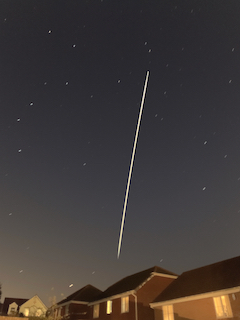
Photo of the day, an overhead pass of the International Space Station taken this evening on my iPhone. This was the second half of the pass after a quick run from the back garden to the front garden. You can also see the constellation of the Great Bear/Big Dipper or Plough to the left of the picture. The bright star to the bottom is Arcturus.

The ISS is approx 250 miles up and going 17,500mph. Currently has a crew of 3 three, although it can accommodate up to nine. There are usually six, and they usually stay on board for around six months. The current crew is US astronauts Jessica Meir and Andrew “Drew” Morgan and Russian Cosmonaut Oleg Skripochka. Self isolation at its best! You can learn more about the ISS here 

International Space Station over Barry


Friday, February 28, 2014

4G: Godsend or liability?

I have recently received notification from O2 that I can now access 4G. Sure enough my free 4G bolt on has been activated on my iPhone 5s (by the way it's space grey, not gold as O2's 4g checker insisted). In the week or so I've had this enabled, I haven't seen a 4G signal anywhere near where I live in South Wales.

Also, for information (bear with me, this becomes relevant shortly), I have a 1Gb data "bolt on". I've recently upped this from 500mb a month as a couple of times I've just tipped over the 500mb a month limit. I also NEVER stream video unless I'm on a wifi connection.

Yesterday I travelled to London on a 2 day business trip. I was delighted as my train approached London to see a 4G signal, and indeed, the connection on the normal apps I use (Twitter, Facebook, email, seemed quick).

Last night in my hotel room I checked my data using the O2 app and saw that I had 943 Mb available for the remainder of my contacted month (to 25th March). As I had a 4G signal, I attempted an iPhone FaceTime (video) call home to my wife. This turned out to be very short because the connection at one end (not sure whose) wasn't great. According to the call log, the call lasted 2 minutes and used 5Mb of data. Then, using my iPhone in no different way than I normally do, including some limited tethering to my iPad, by about 8pm my remaining data had dropped from 943mb to about 740mb. Odd, but I wasn't entirely alarmed.

By this time my iPhone was sat on the desk in my hotel room and although it was tethered to my iPad, the ONLY thing I was actively doing was watching a film on the iPad. It's important to note that the video file was actually physically on the iPad (that is, it was NOT being streamed to the iPad from anywhere). The iPhone had no open apps running (as far as I could tell).

Imagine my surprise therefore when my iPhone text alert went off at 21.17 to say I had used all my UK data for the month!!!!! Somewhere between about 8pm and 17 minutes past 9 I had used almost 3/4 gig of data doing nothing other than looking at twitter and during which time I had streamed no video or used any other data intensive apps, and was predominantly watching a local video file on my iPad about 6 feet away from my iPhone.

I immediately bought (rather begrudgingly) a further 1GB bolt on as I've still got nearly a month before my data monthly rolling contract end. At the time of writing this, about (24 hours later), according to O2's app, I have only 420mb of that available, so the best part of another half gig of data has disappeared.

What the hell is going on? How can I have used nearly 1.5Gb data in around 4 hours, doing nothing other than the things I normally do, that in any normal month, leave me using around 500mb data?

The ONLY difference as far as I can see has been the enablement of 4G and being in a 4G area. 4G should use MORE data, it should just make it quicker.

I am perplexed, and if this is the 4G experience, then frankly I don't want it.

So, I spoke to a very pleasant girl at O2 tonight who told me that although this amount of data consumption was unusually high, it was because she could see that my phone was downloading "updates" at 12 midnight and 3am and this was consuming the large amounts of data.

Now I'm REALLY perplexed. According to my phone iTunes and App Store settings, automatic downloads is turned ON for music and apps (though I've downloaded none of either in the last few days, and is OFF for updates. Additionally the "use cellular data" (for automatic downloads and iTunes Match (which I don't use) is OFF.

Basically, the girl on the O2 call told me that was that. She was sorry, but couldn't offer anything other than suggesting I take the phone to an Apple Store to have it checked.

I can't see that's going to help. I'll keep a close eye on my data use age, but worryingly I suspect that my two day jaunt into a 4G area has something to do with this. It shouldn't have, but there's no other conclusion I can draw


- Posted using BlogPress from my iPad Mini

Saturday, February 22, 2014

An Apple a day

OK I admit it. I'm an Apple fan.

Not a "fanboi" in the sense that I don't believe in any tech other than that coming out of 1 Infinite Loop, Cupertino, but over the last 5-6 years I've slowly moved to an entirely Apple setup.

As the photo shows, I now have the complete set. An iPhone 5s, an iPad Mini, a 13" Macbook Pro, and the latest addition, a 21" iMac desktop.

I don't hate Windows as an operating system - I use it every day in work, and there's at least 3 Windows boxes/laptops loitering around the house. My Apple kit though offers everything I need, in every form factor I need (for the moment). And I'm very happy with it. It works, it synchronises together seamleslsy, and combined that many of my "go to" applications are now cloud based (Dropbox, Evernote, Skype, Twitter, Facebook, Gmail etc) it means I always have access to what I need.

I've been fortunate enough that circumstances have allowed me to migrate to Apple devices on a "want" basis - I want it, I don't "need" it. And I'm grateful for that.

The latest piece of kit is that gorgeous 21" iMac. It's the "base" model - but that still comes in at a hefty price. In part you're paying for the Apple brand, but you do get what you pay for. All my Apple devices are stunningly designed, they work pretty flawlessly, and they last a long time.  My Macbook Pro is over 4 years old now, and but for a swap out of the original hard drive for a bigger SSD a couple of months ago, and a RAM boost a couple of years ago, works as well now as it did when I first got it. And it still looks as good as new. The iMac though is the pick of the bunch. It wouldn't look out of place anywhere. It's amazingly thin considering that monitor house all the gubbins. There's only 1 lead - the power lead. It's a work of art. the mouse and keyboard are wireless - the keyboard itself is stunningly engineered - how can you say that about something as mundane as a keyboard?

It's kit that wants to be used. And it's a pleasure to use it.

Sunday, October 06, 2013

iPhone time

I've had my current iPhone ( a version 4) for almost 3 and a half years now, and it's showing signs of wear, tear and slowdown. It's time to upgrade, and I'm looking at an iPhone 5s. I've dallied with the idea of moving to Android, but I'm a die hard iPhone man at heart, and it complements my iPad Mini and Macbook Pro. I've got a birthday coming up to, so nows the best opportunity to get one. I don't expect one for my birthday, let's get that straight - they're a LOT of money, but a contribution in lieu of a gift wrapped present would be ideal..... Ooohh, shiny...

Thursday, September 19, 2013

iOS 7: One day in

Like millions of others worldwide, I upgraded the OS to iOS7 yesterday on my iPhone 4 and iPad Mini. With less than 24 hours experience of the new OS, here are my initial, and very subjective impressions.

Lets get this one out of the way first. On my iPhone 4 which is almost three and a half years old, there are occasions when this shiny new OS is decidely laggy. That may be down to un-optimised apps (although the new iOS7 ready version of Facebook takes about 17 seconds to launch). It's more likely down to the ageing hardware. On the iPad Mini is zips along.

Ok, so here's the lowdown

The Good

  • It's a shiny new interface bring a much needed refresh to a perfectly capable but tired looking OS
  • The notification centre is FAR better and brings the iOS devices closer to what Android and other mobile users have had for a while
  • Ditto the ability to quickly and easily change key settings like wifi, BT etc.
  • Cool (but frankly nonfunctional animations as windows/apps open and close
  • The swipe to close apps in multi-tasking - hey where have I seen that before? Oh yes, Palm's WebOS about 6 years ago.....
  • A neat touch - on the iPad Mini at least - Messages where you don't have a photo for the contact show a grey circle with their initials
  • Apple's weather app - looks much better, though I still use the BBC weather app as my preferred choice

The Bad
  • Siri - never the greatest voice, but now sounds like he's talking through the back of a pillow after having downed eleven pints of lager (yes I know I can change it to that dreadful American woman's voice - or even a foreign language, as demonstrated by both my kids on their iPhones during a Siri-fest a few minutes ago)
  • The keyboard. 
    • The new keyboard is inconsistently applied throughout apps - most use the new one, some (including some of Apple's own - Pages for one) use the old version. Poor.
    • Because the new keyboard is less shaded and the fonts are much thinner, it feels smaller to me. I know it's an optical illusion and I'll get used to it. But that's how it feels at the moment
  • That shiny new interface? It looks like cartoons. Not yet convinced it's better than the old interface.
  • Suddenly after three years of swiping emails left to right to call up the delete button I have to swipe right to left. Why?
  • Reminders. Never the greatest app in the box, but it was vaguely functional (though I still can't get proper sync between my iPhone & my iPad Mini in this one app. Now it's far less intuitive (at least to me), and intuitiveness is something Apple prides itself on.
  • Moving app icons around the screens. This might just be down to my ageing hardware and iOS7's performance on it, but I've found it MUCH harder to accurately drag and drop app icons without putting them somewhere I didn't mean to.
On balance it looks as though there are more cons than pros - that's not necessarily the whole picture though. I'll get used to the OS and some of those concerns will go. There may be some early bugs that a future dot release will improve on.

On the whole, I think it's better.

Friday, September 13, 2013

Choices, choices

So the time has come. My iPhone 4 has served me admirably for almost 40 months, but it's time to change.

It still works. It still does the things I want it to do. But it is slowing down. Things that used to happen quickly seem to take longer - apps opening, screens refreshing etc. I did a restore a while back and it improved things a bit, but not much. It's starting to look a bit tired too. A couple of scratches here and there and some damage to the casing in a couple of places and a tiny crack on the topmost left of the screen. Hardly noticeable, but there nonetheless.

Apple have just announced two new phones. The "budget" 5C at a whopping £479 sim free. Essentially it's an iPhone 5 in a coloured case. And the 5S, same form factor as the current 5, with a choice of 3 case colours, but faster, better camera and a fingerprint scanner. If the 5C is budget, the 5S isn't. The cheapest variant weighs in at £549, £80 dearer than the 5C and £20 dearer than the current 5.

I've toyed with the idea of getting an Android device. The Galaxy S4 and HTC One look nice. They rock bigger screens than the iPhone, and Android has certainly come a long way, but.....

Despite those who say the iPhone is lagging behind, it isn't. I played with some Android phones in a shop today. They're good. Very good. But pick up an iPhone and it just oozes something the Android devices just don't have. It's not the OS. It's certainly not the hardware although Apples kit is still lovely stuff. It's something in the ether. It's smoother, silkier in use. It's comfortable to hold.

And the killer for me, is the seamless integration across my phone, my tablet (an iPad Mini) and my MacBook Pro itself now 4 years old but still a honey...

No, I'm afraid it's going to have to be Apple and the iPhone again. The only question is which variant. £549 is eye wateringly steep for a skinflint like me, but then it's "only" £80 more than the 5C which is effectively last years model in a new skin. As I change phones so rarely, the sensible choice would be to get the best I could afford.then again I could get the 5C with a view to upgrading when the iPhone 6 arrives next autumn.

Choices, choices.......

- Posted using BlogPress from my iPad Mini

Wednesday, October 17, 2012

Four of the best

I've posted something similar to this before, but it was a while ago, and may be useful to rehash for those of you who are newer to smartphones, or have not come across these before (unlikely.

In no particular order - well that's not strictly true - I'm going by the order they appear on my phone.....


Evernote
 Evernote is the ideal app for storing your snippets of stuff. It's cross platform, so there are variants for Windows, Mac, iOS, Android etc and it has an online app too - by default you sync your stuff to the cloud, but if you run it off several devices it's available everywhere. You can store notes, audio, photos, files etc etc. Basic comes free - if you have lots you start to pay, but it's worth it. There are also browser plug ins so you can snip info straight from web pages - or even whole web pages if you want. If you store loads of "stuff", it's a no brainer.


Dropbox
One of the earliest modern "cloud" repositories and arguably still one of the best. Download the app (again it's cross platform), and anything you save in your dropbox folder gets synced to the cloud - where you can also access it online. It's got versioning, sharing and loads more. Again, there's a rather stingy 2GB limit on the free version, but you can pay for more space. Again, where-ever you are whatever device you're using, you can access your Dropbox stuff.


WeekCal
I use the calendar on my iPhone a lot. The bog standard Apple calendar however is fairly sparse in functionality. I've long used WeekCal in it's place. It's brilliant. Loads of options, loads of views, great support. It syncs to the inbuilt calendar so if like me you use your iPhone hooked via iCloud to a Macbook (or Mac desktop) everything is there, all the time. A highly polished calendar app and highly recommended.

1Password
There are a myriad of password managers out there. You really need one. No you really do. Really. If you're using the same password, or simple passwords for multiple sites, frankly you're an idiot (sorry, but it's true). You're just asking to get hacked, and probably, sooner or later you will be.
1Password allows you to create and manage complicated paswords that look like "gGt6%_43@£449+qEsW3" (and no, that's not one of mine). But the beauty of it is, you don't need to know this, and you certainly don't need to remember it. 1Password does the creation, storing and retrieval from a browser plug in. All you need to do is have one (1) secure master password. Password does the rest. There are as I said, lots of these password managers/vaults out there. 1Password is pricy. But in my view it's the best. Also cross platform, so I have it on my PC, my Macbook and my iPhone and it all stays nicely in sync without me worrying about it. 


Gadget dilemmas

Generally I'm a happy iPhone 4 user. Since the mad rush of blood to the head when I stood in the opening day queue for 5 hours for my "4"  to replace my iPhone 3G I've enjoyed using the phone. When the 4S cam along, there was little in there to persuade me to upgrade, and since then - almost two and a half years now, I've been content.

The arrival of the Samsung Galaxy SIII earlier this year did peek my interest. It's a great phone, with a fantastic screen, and great specs, and over the summer I started to waver just slightly, but have always held back because I still liked the iPhone 4, and I have a Macbook Pro, and I'm getting an iPad, and Apple stuff, well...'just works'.

The other thing I was holding off for, was the arrival of the iPhone 5. I was keen to see what Apple would do to counter the charge of the SIII as one of the flagship smartphones. Well by the time Apple announced it, we all knew anyway because of the leaks. And I have to say, I'm a little disappointed. I was most hoping for a bigger screen. What we've got is a 'taller' screen. Other than that, and a few inevitable tweaks in processor/camera it's much the same as the 4S and arguably 4 before it.

Those in praise say it's all because it's evolutionary rather than revolutionary and why change a winning formula? The critics say Apple are running out of ideas. I'm largely with the former camp, but I was hoping for a bigger (i.e. taller AND wider) screen. My eyes aren't what they used to be, even with glasses. The SIII screen is very appealing.

Additionally, having played with a 5 a couple of times, it's newfound thinness and loss of weight makes it feel....let's not beat about the bush. Cheaper. Although clearly it's not with the cheapest unlocked version (the way I prefer to buy) weighing in at a very hefty £529.

And more worrying, one of the 5's I've played with, and reports from more than one person I know who's got one, have suggested build quality isn't quite what it once was - despite Apple's reinforcement of matching parts. One of the units I saw had a distinct rattle if you tapped the rear plate. The user had been told it was the vibrate unit in the phone. Sounds very dodgy to me.

The synchronicity I have with my Apple devices is re-creatable on Android & the SIII with Google and Dropbox - and I already use Gmail as my default mail anyway. I can get an unlocked SIII for under £450.  So what's stopping me shunning the iPhone 5 and going with the SIII or keeping the faith and upgrading to an iPhone 5?

Well firstly, either way it's a lot of money. £450 - £529's worth to be precise. I can do a lot with that sort of dosh. Secondly, and perhaps most importantly (and sensibly), at the moment, my iPhone 4 is still performing admirably. Arguably it does all I need from a smartphone. I won't be doing anything differently, or new if I had a 5 or an SIII. I'd just have a newer device, and be lighter of pocket.

It's inevitable that I will upgrade at some point. And it's probably inevitable that it will be a 5 as I do like Apple devices and the Apple 'ecosystem'. But it's not guaranteed - yet.

I'm off to count my money.....

Wednesday, August 24, 2011

Apple: Innovative, dominant or just control freaks?

Despite their über cool kit, and oh so easy to use OS's, Apple have a habit of rubbing it's own users up the wrong way from time to time.

One of the things that irritates a lot of people about the iPhone and iOS, is Apple's insistence on approving everything, and apparently vetoing apps that it thinks are too similar to it's own offerings. They usually cite the need for control and having a closed ecosystem does have positives, but I struggle to understand the rationale why when developers are coding better apps than Apple can provide.

Now I think it's fair to say that the general consensus, certainly amongst nearly all the iPhone users I know, personally and online, is that the iPhone's default calendar app is pretty crap.

There are all sorts of things that someone who makes a lot of use of a calendar (which is most of us I guess), that the in-built offering can't do. It's views are limited, it can't set a default alarm for new entries, and more.

So inevitably a plethora of alternative have sprung up. Some are relatively simplistic like Agenda and some like Pocket Informant try to cram loads of features in.

I like the principle of the default app but want something a bit more. Utilitap's Week Cal fits the bill perfectly and I've been using it for some months. I particularly like the the various views the app offers.

Tonight I noticed there was another update for this in the App Store , but imagine my suprise when checking the details of the update, its said, and I quote:

Apple ordered us to change the old month and change the day overview from Week Calendar. We had no choice but to comply, otherwise there would be no Week Calendar app anymore

This is astounding.

Apple must be aware that users want more from the in-built Calendar app - if they don't their head is in the sand. They are clearly aware that there are better apps than theirs out there. But to make a developer remove functionality and stubbornly fail to develop their own app to provide the functionality that users want (unless by some miracle it's coming in the iPhone 5) beggars belief and is arrogance in the extreme.

I am seeing more and more people starting to talk about the closed nature of the iOS system as a problem rather than a plus. If Apple keep doing this, developers will get fed up, and they'll go and code for Android (if they're not already).

Apple needs to take a long hard look at itself in relation to this. Idiots.

I've "downgraded" Week Cal with the latest update, but I'm never going back to the default Calendar app. It's been long consigned to an "unused apps" folder, along interestingly with the default weather app, the default stocks app.....get my drift?


Wednesday, June 08, 2011

Apple goodness....Lion, iOS5 and iCloud

For users of Apple products (and that's me with an iPhone 4 and a Macbook Pro), the keynote delivered by Steve Jobs and his crew at this week's WWDC has shown us some wondrous goodies that we can expect over the next few months.

I'm no techie, so I'm not going into any massive detail here, but essentially there are three strands to what's coming.

  1. Lion - the new incarnation of Mac OSX - the core Mac operating system. Already a super slick user interface, Lion brings a whole host of UI enhancements, better and clevere multi-touch gestures, improved apps and a whole lot more. And all for $29.99 (though here in the UK that'll probably translate to a more expensive £29.99. And that's for a 5 license OS - yes, you can install it legally on 5 Macs!
  2. iOS5 - the latest operating system version for iOS devices - the iPhone, iPad and iPod Touch. Again a whole ream of developments and enhancements - too many to go into here, but some notable ones include improved notifications, better handling of previously purchased apps, improved mail app, and great use of the lock screen. It's coming in the Autumn.
  3. iCloud. The new way to sync your data across all Apple devices. At the moment I use MobileMe (and pay for the privilege). That's now effectively dead in the water. When iCloud arrives it basically means if you change data on one device (my iPhone for example), that data is automatically updated on my Macbook Pro. In the words of Steve Jobs...."It just works" No set up, no fiddling, it just works. And.....it's FREE! Awesome.
If you want more detail about all this lovely Apple goodness, then trot across to any of the tech blogs/sites which are awash with the detail of these three core elements. Me, I just can't wait to get hold of them.

Sunday, May 29, 2011

Keeping it all together

Regular readers will know that I've got a pretty eclectic approach to computing. I have no real affinity for any one OS, and have desktop devices running Windows 7, a Macbook Pro on Mac OSX and a netbook running Ubuntu netbook edition. Chuck in my ever to hand iPhone, and the challenge for me is keeping everything together and in sync.

In all honesty, it's made a bit simpler in that the Ubuntu netbook rarely sees the light of day. It's an old Asus Eee with virtually no memory or storage, and I put Ubuntu netbook on it more as an experiment than anything else (it works fine though).

What is happening therefore, is a slow and gradual transition to cloud computing. Applications I tend to prefer are cross platform, and with an ability to sync seamlessly with whichever device I'm using . I'm not a complicated, or power user, which makes life simpler still, and what follows is a brief description of my key picks.


Dropbox
If you work in different locations on different computers and haven't used or come across Dropbox yet, you're missing out. You install the Dropbox client on all the devices you use and it creates a Dropbox folder - so it's installed on all my PC's, laptop, netbook and I have the iPhone app. Whenever you are connected to the Internet, whatever you have saved to this folder is synced to Dropbox. Then, whenever you connect using one of your other devices, all the changes are automatically synced back to that device. Simple. Add in versioning, so you know which is the latest version, and the fact that it's free for up to 2GB storage, and you not only have a way of keeping everything in sync across multiple computers, but some free online storage too.

If you are going to check it out - drop me a line first. I can refer you, and that helps me boost my storage space!
Highly recommended.


Evernote
One of the things that many people require from their computing devices is a good way of collating all those snippet of information, notes, screenshots etc. There are literally hundreds of thousands of solutions out there, but one of the best is Evernote.
Evernote, like Dropbox is cross platform, and you can sync to all your platforms. Like Dropbox it's also accessible online, and like Dropbox free at the basic level.It also has browser extensions so you can clip all, or bits of web pages directly to your Evernote account.
You can record text notes, voice notes, photo notes, documents - pretty much anything. It's fully searchable, you can have multiple "notebooks" within your account, and use tags on notes. A Premium version (which I use) brings added benefits, but for most people, the free version is just fine. If you need to store "stuff", then this is the way to do it.
Brilliant!


Email/Contacts/Calendar
Gmail is my preferred email route, because everything is available on any Internet connected device. It's got a a lot of functionality too - more than most people realise, you've just got to dig a bit to find some of the optionsd and settings.


My calendar and contacts are all handled by Apple's "MobileMe" service. You have to pay for it, but it keeps my calendar and contacts beautifully in sync on my Macbook and iPhone (I tend not to do anything that needs calendar and contact access on the PC, although I could always access Mobile Me through the browser if I wanted to.

I've tried a few times to manage contacts via Google Contacts, but I find there's always some corruption/duplication though the sync process back to the iPhone/Macbook. I know some manage this perfectly fine, but I've never managed to do so to my satisfaction.

So there you have it. Core functions of email, contacts, calendar, notes and document sync/storage handled through some first class online/cross platform applications, that are free.

It's a no brainer.


Tuesday, March 15, 2011

Week Cal for iPhone

For many iPhone users the default Calendar app is OK, but for others it's perceived as one of the weaker areas on the device. For a generation brought up on Palm's calendars, or third party offering like Datebook, the standard iPhone app just didn't cut the mustard.

Many pretenders to the crown have come and gone, often stymied by Apple's reluctance or stubbornness to let developers get right at the heart of the functionality they need to produce a decent competitor.

But then along came Week Cal by Wasabi Apps, http://www.wasabi-apps.com/weekcalendar/.

All of a sudden, here was an app that looked like it could offer a decent alternative including that fabled week view missing from Apple's native app. It got some pretty decent reviews, and I decided a few months back to stop using the default Calendar app in favour of the new pretender. And I liked it. It wasn't particularly barnstorming for me, but it was efficient, and that week view certainly made it better.

It's just gone to v3.0, and there are some great new additions to it's functionality. It's got a new year view - OK, not much detail here on an iPhone screen, but very easy to quickly navigate to a month/day.

More tellingly, and something that will possibly swing it for ex Palm users is a terrific Agenda/week view that you can customise with up to 8 different layouts. It almost looks like a Palm! (Note to self....move on...Palm's gone).

Additionally you can rotate views and have a different view depending on whether you're in portrait or landscape mode. For those that want it, there.s a global birthday alert (I have a wife for that). There are a myriad of other features including various full screen options, the ability to auto-hide bars, have different badge alerts according
to your preference, show or hide week numbers and change font sizes.

The neat ability to tap and hold to start data entry makes it feel much more useable than the native app, and generally this whole app gives a feeling of being very polished. I highly recommend this app for anyone who's serious about using a calendar on an iPhone. It's miles ahead of the native app, and Apple really should take a long hard look at this.

Monday, March 14, 2011

Hidden data use and the iPhone

A salutary tale

I'm on O2 as my carrier using an iPhone 4. I, like most people was a bit miffed when O2 slapped on a 500mb cap on data usage. On reflection though, I rarely get even close to using that. Sensible use on 3G, plus using wifi wherever I can, including at home means my typical monthly data use over 3G is in the region of 80mb - 100mb.

A couple of days ago I paid a cursory glance at my usage in Settings/General/Usage and it was around the 30mb mark. About right given my billing month runs from 25th of the month.

Over the weekend I've mostly been at home (on wifi) or at Cardiff City Stadium - where regular readers will know I don't get a data signal. I haven't been doing anything different, or downloaded any new apps - though I have updated a few existing ones.

Imagine my surprise therefore when at 8.57am this morning a text from O2 pinged in saying I was at 80% of my data limit and they'd let me know if I went over it. Sure enough a quick check in settings showed around 400mb used. Somewhat perplexed, but with no time to check anything (I'm a busy man) I vowed to check things out this evening. Then 30 minutes later I got another text saying I'd exceeded my limit and now needed to buy a bolt on.

I suppose at least they told me rather than letting me carry on and shafting me with a hefty bill at month end.

Anyway, busy I may be but not that busy. I checked again, and use was at 477mb according to Settings. I re-booted the iphone and made sure there were no apps running. What I should have done was check what apps were running - but as I've said before I wasn't doing anything differently to normal.

I then contacted O2 - via chat as it happened. Their phone lines - my first port of call said they were very busy, but within 20 secs of being on the web site I was offered a chat session which I gratefully took.

The next 20 minutes basically confirmed what I'd been told by text. Yes I was over my limit, yes I'd need a bolt on and given I said I'd not normally come near this level of use, they did agree to "look into it", but I suspect they won't find anything.

So, for a £5 bolt on I've got another 500mb to tie me over to my next billing date in 10 days time. Worryingly, I still have no idea which app was the culprit.

My vague recollection is that the following were in the multi-task bar - but remember these apps re supposed to be in a suspended (ie effectively stopped) state.

Sky Sports Football, Safari, Mail, Twitter, Messages, ECB Cricket, Notes, Reeder, Facebook, Contacts, SafeWallet and Angry Birds. I don't (or rather very rarely) stream video or music and certainly haven't been doing this in the last few days. One of them though, appears to have been doing something rather naughty. Two pieces of supporting evidence were significant battery drain - down from 100% at 7.30am to 68% by 9.30 when normally I'm not down to 68% by the end of the day, and the fact the phone did appear to be quite warm at one stage.

So, conclusions?

Well, clearly not all apps go into a suspend state when you open another app or return to the home screen, despite what most people would have you believe. I've heard of this with apps like Pandora and Spotify but I don't use those. Gavin suggested it might be a location services issue, although I don't think I've changed anything since yesterday.

A bit of a mystery then. One things for sure. I'll be paying a regular trip to the task bare to check what's there and clearing them down, and I'll be paying a bit more attention to my data usage over the next few weeks.

Thursday, March 03, 2011

The iPhone Twitter app v3.3 Spawn of the Devil

I have 3 or 4 Twitter apps on my iPhone, but my preferred one is the actual Twitter app itself. Simple and intuitive, it does all I want in a slick and easy way.

Today v3.3 became available, and it brings a number of neat tweaks and updates that make the whole process of tweeting even better.

BUT, and it's a huge but..............

One of the updates in v3.3 puts a trend bar at the top of the timeline - it's that horrible grey box with #worldbookday in the screenshot here. It constantly updates with the latest trending topics, and here's the rub. You can't turn it off.

I'm personally not interested in trending topics. I've never taken any notice of them, and I don't want them forced on me in a way that I can't turn off. They're worse than ads. I've got a few "lite" apps that have ads, and they're nowhere near as obtrusive and annoying as this.

The iTunes stores already has a ream of responses (including one from me) about how absolutely annoying this is.

A piece of software shouldn't make you angry, but this has. It's turned an app I use every day - several times a day, and generally have found to be a very decent app into something I hate in an instant.

I hope Twitter takes notice of user feedback and at the very least provides a quick update with the opportunity to turn this bloody thing off.

In the meantime I've switched to another twitter app.

I can't believe I've got so het up about this, but there you go. I am. Grrrrr....

Tuesday, December 28, 2010

Christmas goodies: Flip Ultra HD

I must have been a good lad this year, as once again, Santa left some techno goodness under the tree for me.

I'm now the lucky owner of a Flip Ultra HD 8GB pocket video recorder. It's a marvellous, and very simple piece of video recorder gadgetry. Smaller (but about twice as thick) as my iPhone 4 - bearing in mind the iPhone is the "world's thinnest smartphone", there's really not much to this recorder. You turn it on, press the big red button and it records. To stop, press the big red button again!

To upload video, just "flip" out in-built USB adapter, whereupon on first connection you get the chance to install the Flip software (to Mac or PC), and off you go.

The only other two buttons on the device (other than the on/off and big red button) are a review and delete button. The settings are basic - language, whether you want sound on button press, the red recording light to show etc).

It runs on the inbuilt battery, which is removable, and replaceable by 3x AAA's. The 8GB holds about 2 hours worth of the HD video it records. Note that it doesn't take stills.

You wouldn't want to record an epic on it - or even anything overly lengthy. It's ideal for short clips which you might want to email, upload to YouTube of embed on a site.

The Flip software is pretty basic, but does allow you to do some pretty limited editing and movie creation. You van of course import it into any video editing suite that you may have that supports it's native MP4 file format.

It complements my Samsung FD30 perfectly. If I want longer scenes, with bigger zoom (the Flip has a pretty limited and digital only zoom) and fancy effects (which I never use), then the Sammy gets the nod. If it's quick clips and I don't want to lug my Samsung around (which is slightly smaller than a can of coke anyway) then the Flip will do the business.

Why have this and the iPhone that records HD video as well? The iPhone's definitely a good backup and is with me all the time, but for longer clips the Flip is easier to hold, is easy to upload, holds 2 hours without me worrying about either space or battery life on the iPhone.

It's beauty is it's pocket-ability and the high quality of the video you get. It's a far, far cry from the cumbersome handled recorders of some time ago.

I love it!